

Most browser comparisons repeat the same assumptions without checking them against current data: Chrome is bloated, Firefox is for privacy nerds, Brave is just Chrome with ad-blocking, and any privacy-first browser must be lighter on resources because it's not running ad-tracking infrastructure. Testing from 2024 through 2026 contradicts at least one of those assumptions outright.
Here's what the numbers actually show across the five most-compared browsers right now.
The market reality
Chrome holds 65.1% of global market share as of March 2026 per StatCounter, with Safari at 18.6%, Edge at 5.2%, Firefox at 2.7% and Opera at 2.4%. Brave doesn't show up in those rankings because it shares Chrome's user agent string to avoid compatibility blocks on websites, but Brave CEO Brendan Eich reported more than 112 million monthly active users as of March 2026 — a meaningful userbase that traditional market-share tools simply don't capture.
The RAM numbers, tab by tab
This is where things get specific. In controlled tests running identical tab counts:
Chrome uses roughly 240MB per tab in recent measurements, scaling to 2-3GB of RAM with 20 tabs open. The technical reason is deliberate: Chrome runs every tab, extension and plugin in isolated sandboxed processes, so if one page crashes, the rest of the browser keeps working. That stability and security tradeoff comes at the cost of higher memory use.
Firefox uses around 180MB per tab under the same conditions — meaningfully less than Chrome, landing between 1 and 1.5GB with 20 tabs open.
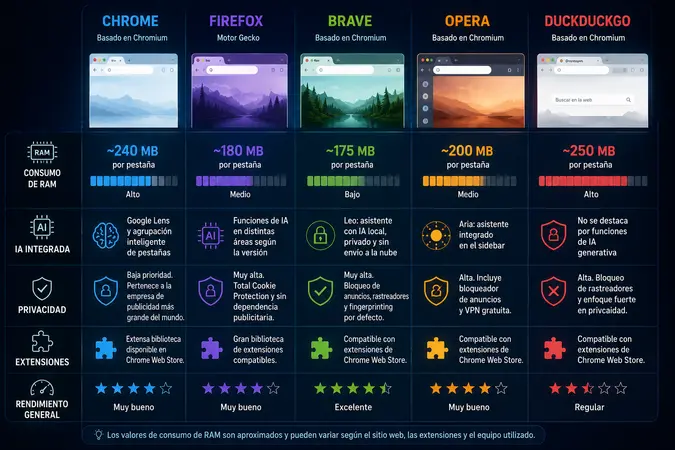
Brave, despite running on the Chromium engine, measured at roughly 175MB per tab in direct side-by-side comparisons — the lightest of the three in that specific test. But Brave's own technical documentation acknowledges its RAM usage runs 4.6% higher than base Chrome on average, attributed to the native ad and tracker blocking running by default. The discrepancy between these two findings comes down to what's being tested: on ad-heavy pages, Brave's blocking reduces total page weight and ends up saving memory overall; on clean pages with minimal ads, the blocking engine itself adds overhead Chrome simply doesn't carry.
Opera tends to behave consistently in resource testing, and its bundled features — built-in ad blocker, sidebar tools — can reduce the need for separate memory-hungry extensions that Chrome or Firefox users typically install on top.
The DuckDuckGo surprise
Here's the finding that breaks the standard narrative. DuckDuckGo's desktop browser — marketed primarily on privacy — uses more RAM and sometimes more CPU than Chrome in real-world multi-tab and video playback testing, according to long-term user reports spanning 2024 through 2026.
One specific Windows 11 test found DuckDuckGo using between 1.6 and 2GB of RAM in a scenario where Chrome used approximately 1.2GB — with CPU usage spiking to 21.2% for DuckDuckGo versus 7.6% for Chrome in the same setup. The technical explanation: DuckDuckGo's Windows builds bundle embedded WebView runtime copies, which also inflates the installer to nearly 1GB on disk, substantially heavier than Chrome's footprint.
Independent benchmark reviews also show Chrome running slightly ahead of DuckDuckGo in JavaScript performance (JetStream) and notably ahead in graphics tests (MotionMark) across 2023-2026 testing cycles.
Why high RAM use isn't automatically bad
A nuance that gets lost in simplified comparisons: heavy memory use doesn't automatically mean worse performance. A modern browser uses available RAM to preload pages, keep tabs instantly ready to display, and run complex web apps — Google Workspace, Figma, CRM dashboards — smoothly. On a machine with 16 or 32GB of RAM, Chrome using 4-5GB to keep everything responsive is, technically, good resource management rather than a flaw. The real problem shows up on machines with 8GB of RAM or less, where every gigabyte actually matters.
Where the AI features actually differ
AI stopped being optional and became a core feature across major browsers, but the implementations diverge sharply:
Edge ships with Copilot built in natively, with strong Microsoft 365 integration — the obvious pick for anyone already living in Microsoft's ecosystem.
Brave runs Leo, an AI assistant with a genuine privacy distinction: it processes with local memory and doesn't send conversation data to third-party cloud servers, unlike most AI assistants bundled into competing browsers.
Chrome includes built-in Google Lens and AI-powered automatic tab grouping, designed to help manage workspaces with large numbers of open tabs.
DuckDuckGo doesn't compete on generative AI features at all — its differentiator remains default tracker blocking, not conversational AI.
Opera and Firefox don't ship an AI assistant as central to their core pitch as Edge or Brave, though both have incorporated AI features in specific areas depending on the release version.
The privacy axis
Firefox remains the only major browser not built on Chromium — it runs Gecko, Mozilla's own engine, developed by a non-profit organization. It includes Total Cookie Protection, isolating cookies per site, and is consistently flagged by independent analysts as the option most aligned with genuine privacy, since Mozilla's survival doesn't depend on an advertising business model.
Brave blocks ads, trackers and fingerprinting techniques by default, with no extensions required — the most aggressive out-of-the-box privacy stance among Chromium-based browsers.
Chrome, built by the world's largest advertising company, ranks privacy as its lowest priority among the five. It remains the most compatible option with the largest extension library, but that's not where it competes.
The practical takeaway
There's no single winner — it depends entirely on what you're optimizing for. If your machine is RAM-constrained and you want the lightest option, Firefox or Brave are the most consistent performers across available data. If you want strong privacy without sacrificing too much performance, Firefox remains the most frequently recommended option among independent analysts. If you want integrated AI that doesn't compromise privacy, Brave with Leo is the most coherent combination. If you live inside the Microsoft ecosystem, Edge with Copilot makes sense. And if you assumed DuckDuckGo was automatically the lightest option because of its privacy focus, the real-world usage data says otherwise.




Comments
💬 Log in to comment💬 Join the conversation and log in to comment.