
The most common mistake when asking Sora to generate a video
When people start experimenting with Sora or other AI video generators, they usually write very simple prompts. Something like:
a woman in a dark room
The model understands the scene, but the result often looks flat or generic. The video may technically match the description, yet it lacks the cinematic feeling that makes a scene look like it belongs in a film.
The issue is not the technology itself. The problem is usually how the prompt is written.
Sora is not only capable of imagining a situation. It can also interpret how that situation would be filmed by a real camera.
Understanding this difference is what can transform a basic AI clip into something that looks much more professional.
The trick: describe the camera
To produce much more realistic videos, it helps to describe the scene using cinematic language.
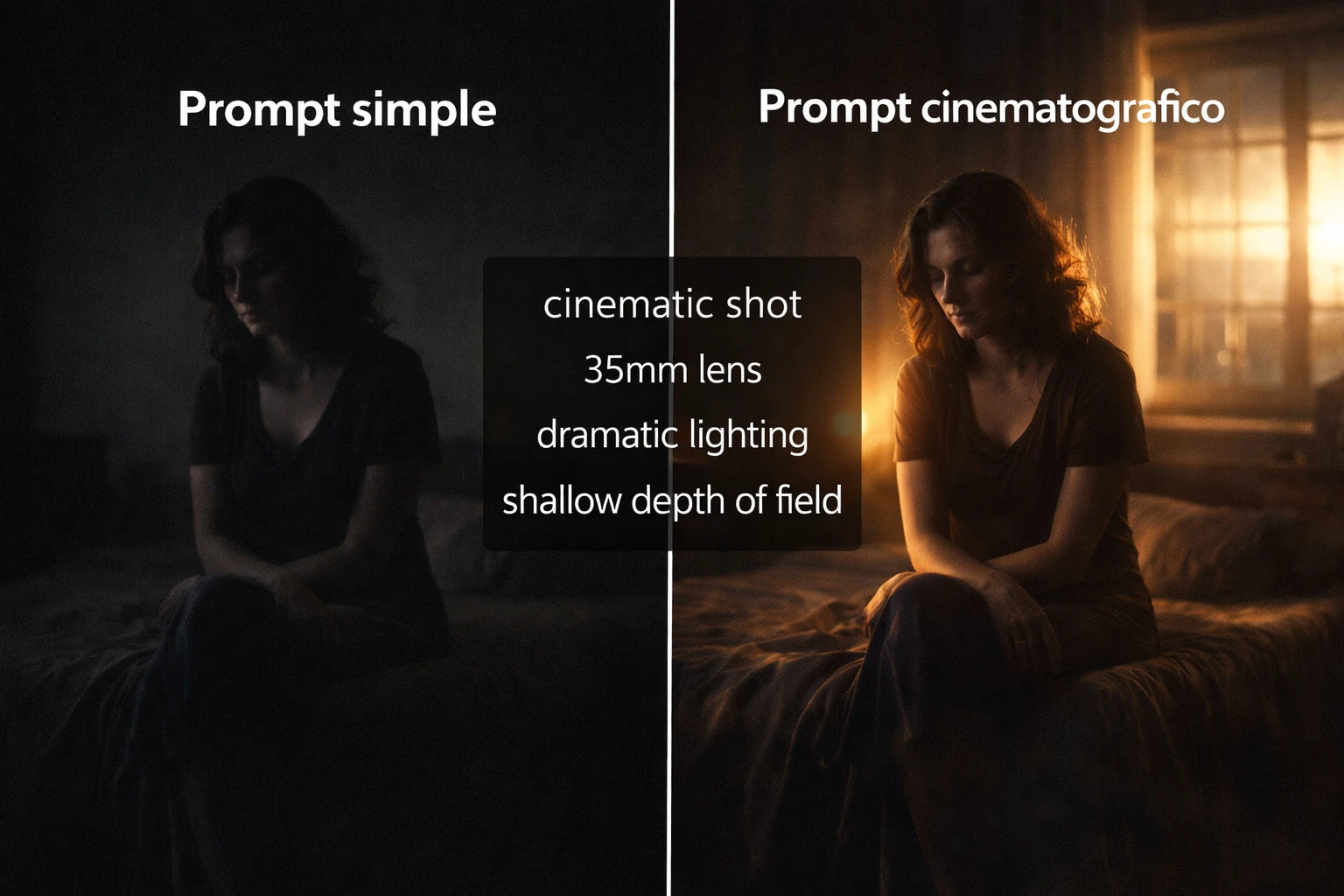
For example, instead of writing only a basic description, you can add elements such as:
cinematic shot, 35mm lens, shallow depth of field, dramatic lighting, soft shadows, handheld camera movement
This small addition can dramatically change the final result.
When Sora receives this type of instruction, it begins to construct the scene as if it were being filmed by a real camera operator.
The difference is often immediately noticeable.
What changes when you use cinematic language
Adding camera and photography terms to a prompt changes the visual structure of the generated video.
Some of the most noticeable improvements include:
more realistic background blur
dramatic and natural looking lighting
credible camera movement
a stronger cinematic atmosphere
Instead of looking like a generic AI animation, the video begins to resemble a scene from a movie or television production.
The importance of lenses in prompts
Another interesting detail is that Sora understands references to different types of camera lenses.
Examples include:
35mm lens
50mm lens
anamorphic lens
Each lens creates a different visual sensation.
A 35mm lens often produces a classic cinematic look used in many films. A 50mm lens tends to feel more natural, closer to human vision.
Anamorphic lenses, frequently used in major movie productions, create a wider and more dramatic visual style.
Including these details in a prompt helps Sora simulate more authentic cinematic images.
Lighting makes a huge difference
Lighting is another essential element that can completely change the visual style of a scene.
Some expressions that usually improve results are:
dramatic lighting
soft shadows
warm ambient light
neon reflections
moody lighting
These terms guide the model to create scenes with stronger contrast and more atmospheric illumination.
For example, a room illuminated by a single lamp or by reflections of neon lights can look much more visually interesting than a scene with uniform lighting.
Camera movement adds realism
Camera movement also plays an important role in making AI videos feel more realistic.
Scenes generated without movement can sometimes appear static or artificial.
However, prompts that include instructions such as:
handheld camera
slow push in
tracking shot
subtle camera shake
tend to produce scenes that feel more dynamic and believable.
A slow camera movement toward a character or a subtle handheld vibration can make the scene look as if it were filmed in real life.
How to avoid the typical “AI video look”
One of the most common problems in AI-generated videos is unnatural movement.
To reduce this effect, it is useful to include phrases such as:
natural human movement
realistic physics
subtle camera shake
These instructions help the model simulate the physical behavior of people and objects more convincingly.
Small adjustments like these can significantly improve the final result.
Example of an improved prompt
To understand the difference, it helps to compare a simple prompt with a more detailed one.
Basic prompt:
a woman in a dark room
Improved prompt:
cinematic handheld camera, small dark room, a woman sitting quietly in the shadows, dramatic lighting from a window, 35mm lens, shallow depth of field, soft shadows, subtle camera shake, ultra realistic cinematic color grading
Both prompts describe the same basic scene, but the second version gives Sora much more information about how the scene should visually appear.
The resulting video typically looks far more cinematic.
Why these details work so well
AI models like Sora are trained with enormous amounts of visual material, including films, documentaries and real-world recordings.
Because of this training, the system understands professional filmmaking terminology.
When a prompt contains references to lenses, lighting or camera movements, the model attempts to recreate the visual language associated with those concepts.
In a way, writing prompts becomes similar to giving instructions to a digital cinematographer.
The future of AI-generated video
Tools like Sora are rapidly transforming how audiovisual content can be created.
Today it is already possible to generate complex scenes, believable characters and cinematic moments using nothing more than text descriptions.
As these technologies continue to evolve, the difference between AI-generated video and traditionally filmed footage will likely become increasingly difficult to distinguish.
For now, learning how to write better prompts remains one of the most powerful ways to unlock the full potential of AI video generation.
And sometimes, a simple detail like describing the camera can be the key that turns an ordinary scene into something that looks like it came straight from a movie.


Comments
💬 Log in to comment💬 Join the conversation and log in to comment.